Shell Basic
I. Basic 💡
1. Brief Introduction 💬
The shell is a command-line interpreter that acts as an interface between users and the operating system kernel. It takes commands entered by the user, parses and executes them, and then returns the results.
Systems administrators can make their jobs much easier by using shell scripts to automate complex, repetitive tasks.
In any case, you can see which shell you’re using by typing: echo $SHELL
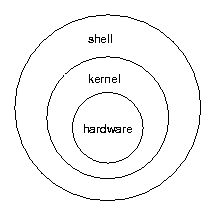
The shell operates in two main modes:
- Interactive Mode: Users enter commands directly in the command line and get immediate feedback.
- Script Mode: A series of commands are written into a text file (a shell script) and executed together.
2. Shell Categories 🗂️
Linux systems provide several types of shell command interpreters, such as sh, zsh, and bash. By default, bash is generally used as the default interpreter.
| Shell | Interactive Features | Script Writing | Common Scenarios | Main Advantages |
|---|---|---|---|---|
sh | Minimal | Standard | System scripts, strong compatibility | Lightweight, high POSIX compatibility |
bash | Rich | Powerful | Default Linux Shell, general scripting | Comprehensive functionality, widely supported |
zsh | Very rich | Strong | Preferred interactive shell for developers | Highly customizable, rich plugins |
ksh | Moderate | Strong | Commercial systems, compatibility scripts | Powerful syntax, comprehensive features |
csh/tcsh | Rich | Weak | Unix-like systems, some developers | C-like syntax, built-in completion features |
3. Shell Scripts 📝
A shell script is a text file composed of shell commands, written following specific syntax. These scripts (with execution permissions enabled) do not require compilation to run but are directly interpreted and executed by the shell interpreter.
Shell scripts can generally be divided into two categories:
- System-Invoked Shell Scripts: These are scripts automatically called by the system. For example,
~/.bashrcis a user-specific configuration file that is automatically invoked during login and whenever a terminal is opened. - User-Created and Invoked Shell Scripts: These scripts are actively created and called by users.
In summary, shell scripts are essential tools for system administrators and developers to enhance efficiency.